Skip to content

Download.Double‑click.Done.

RunDMG turns a .dmg into an installed app in one step. Here's one, from Downloads to done.

No mounting, no dragging.

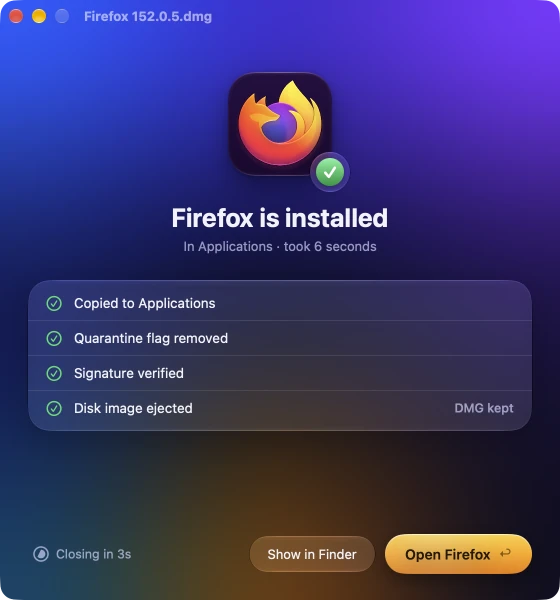
Double-click the .dmg and that's your part done. RunDMG mounts it out of sight, finds the app and starts copying it to Applications.

It opens on the first try.

As it copies, RunDMG takes off the quarantine flag. No “app is damaged”, and no trip to Privacy & Security to click Open Anyway.

Nothing to clean up.

The disk image is ejected and the window closes itself. If you want, the DMG goes to the Trash too.

$ brew install --cask cmer/tap/rundmg
Free for 14 days·macOS 26 Tahoe or later

Eight chores after the double-click. Or none.

After you double-click a DMG, by hand

  1. Find the app in the disk image's window
  2. Drag the app onto the Applications shortcut
  3. Wait for the copy to finish
  4. Eject the disk image
  5. Drag the DMG to the Trash
  6. Open the app: “Apple could not verify…”
  7. Open System Settings, then Privacy & Security, then Open Anyway
  8. Open the app again

With RunDMG

Double-click the DMG

RunDMG finds the app, copies it, ejects the image and takes off the quarantine flag. Moving the DMG to the Trash is one setting away.

Not notarized? It still opens.

macOS stops apps it can't verify, and the way past it is buried in Privacy & Security. RunDMG takes the quarantine flag off as it installs, so a signed app opens on the first try.

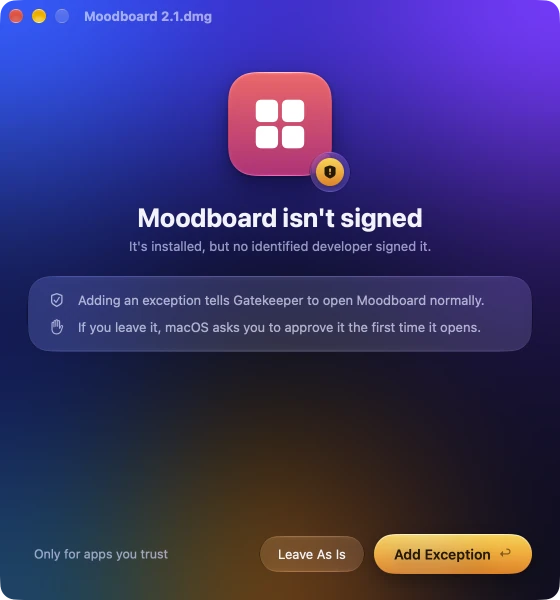
If no developer signed it, RunDMG asks once, while it installs, whether to add a Gatekeeper exception. Say Add Exception and that app opens like any other too.

With RunDMG: Moodboard isn't signed. It's installed, but no identified developer signed it. Buttons: Leave As Is and Add Exception.

Try it for 14 days. Buy it once.

RunDMG

Launch price

$4.99Regular price $9.99once

Free for 14 days first, no card
Every future update
Up to 3 Macs

Prefer Homebrew? Same app, same trial.

$ brew install --cask cmer/tap/rundmg

Questions.

What does it cost?

$9.99, paid once, and $4.99 at launch. That covers every future update and up to 3 Macs. You can use it free for 14 days first.

What happens after the 14 days?

It keeps installing. Until you buy a license, each install starts with a 10-second reminder.

Is skipping Gatekeeper's prompt safe?

RunDMG only touches apps you install with it. It removes the quarantine flag that triggers the prompt, and asks before adding a Gatekeeper exception for an app no developer signed. Install apps from developers you trust. You can keep the quarantine flag in Settings, and say no to the exception.

What if the DMG holds a .pkg, or several apps?

A .pkg or an installer app such as Install Something.app opens for you, and RunDMG ejects the disk image when it quits. If there are several apps, or none, the disk image opens in Finder so you can pick.

Which Macs does it run on?

macOS 26 Tahoe or later, on Apple silicon and Intel.

Can I install it with Homebrew?

Yes: brew install --cask cmer/tap/rundmg. It's the same app, with the same trial and license. RunDMG updates itself either way, so brew upgrade leaves it alone unless you add --greedy.

Does RunDMG send any data?

Nothing about the disk images you install. The update check sends an anonymous install ID and the app version, and the license check talks to Polar. The privacy page lists it all.